The Parked Supplier Invoice Approval System (referred to as Parked Invoices) is an enhancement to Pronto Xi developed by Scope Systems to streamline the invoice entry process. It offers additional editing capabilities and features an invoice approval workflow.
Parked Invoices enables users to enter invoices and store them in a repository (referred to as “parking”), allowing for approval without the need for third-party automation software. Approval workflows can be triggered as necessary before posting the invoices.
Many customers prefer our Parked Invoice System over the Pronto Xi Fast Supplier Invoice entry. The parked invoices screen acts as a repository for supplier invoice information that, for some reason, will not validate and requires user intervention. For example, invoices that cannot be processed automatically.
Key benefits of our Parked Invoice System include:
- Approval of both quantity and price differences between invoice and purchase order where there is no 3-way match
- Streamlined invoice entry process.
- Storage of invoices in a dedicated repository.
- Running validation checks.
- Initiating invoice approval workflows prior to posting.
- Email automation (similar to PRAS) to allow for the approval of both quantity and price differences between invoice and purchase order where there is no 3-way match
One of the system’s key features is the generation of email alerts to notify users of changes and approval requests, eliminating the need for third-party software. From these email notifications, users can:
- Approve direct supplier invoices and credit notes.
- Reject invoices within the system.
- Request additional information concerning invoices.
- Store responses as notes associated with parked invoices to facilitate the approval process.
How does the Scope Parked Invoice System work?
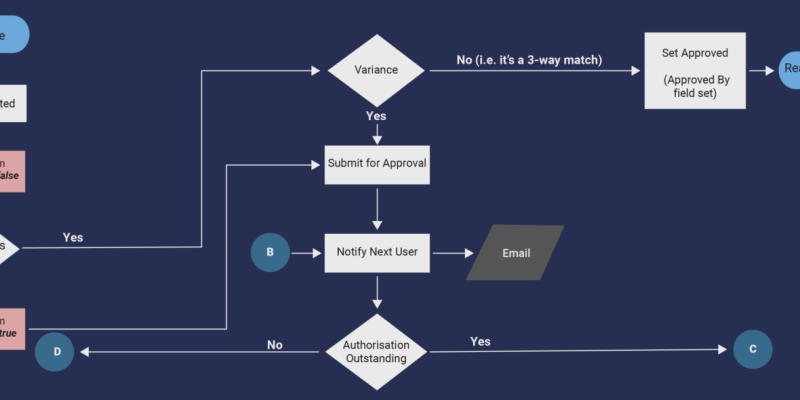
The validation process ensures that the data recorded meets the system’s requirements. If valid, the invoice is set to “pending approval”, and the approval process workflow initiates the authorisation to post the invoice.
Users can ever invoices using an API AP/OCR product that loads header and detail through spreadsheet import.
Process Overview

Enter Invoices
When a new supplier invoice is entered, it is stored in a register and marked as “pending validation.”

Validate
The invoice undergoes validation using predefined methods. If it is valid, it is set to “pending approval.”
Approve
The defined approval workflow initiates, ensuring that the invoice is authorised for posting.
Benefits of Scopes Parked Invoice Supplier Approval System
The Scope Systems Parked Invoice System offers numerous advantages, including the streamlining of administrative tasks and a reduction in the risk of late supplier payments. It can:
- Improve productivity and cash management
- Reduce the time spent emailing and approving non-purchase-related invoices.
- Capture early payment discount opportunities
- Streamline the business processes
- Reduce the risk of late payment to suppliers
- Improve management of supplier invoices
Scope Systems’ Parked Supplier Invoice Approval System streamlines your invoice approval process. This system enhancement is a game-changing solution for your accounts payable process, automating workflows, improving the management of supplier invoices, and reducing the risk of late payments to suppliers.